
Download AI LingoPlay – AI‑Powered Language Learning Tool, Free & Secure
Looking for a modern, free way to practice a new language without the hassle of scheduling tutors or installing bulky software? AI LingoPlay delivers an immersive, browser‑based experience that combines realistic role‑play conversations with instant translation, personalized feedback, and multi‑modal interaction. Whether you are a casual traveler, a university student, or a seasoned polyglot, this tool puts an intelligent language partner right at your fingertips—no download, no registration, and no hidden fees.
Overview
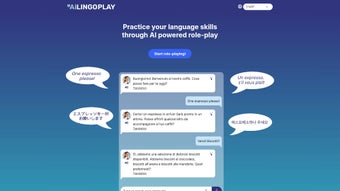
AI LingoPlay is a cutting‑edge web application that transforms the way you practice foreign languages. Instead of static flashcards or isolated drills, LingoPlay immerses you in realistic, AI‑driven role‑play conversations that mimic everyday situations—from ordering a croissant in a Parisian café to hailing a taxi in Berlin. The platform supports more than ten languages, letting learners select the mode that best fits their style: listening, speaking, reading, or typing.
Each interaction is powered by a sophisticated natural‑language model that not only responds in a lifelike manner but also provides instant translations, detailed breakdowns of vocabulary, grammar hints, and personalized feedback based on your input. Because the service runs entirely in the browser, you can start a session with a single click—no sign‑up, no download, and no hidden fees. While the current version is free, the developers plan a subscription model for future premium features, ensuring continuous updates and new conversational scenarios.
Whether you’re a beginner looking for confidence‑building practice or an advanced learner seeking nuanced cultural context, AI LingoPlay offers a flexible, engaging complement to traditional classroom or textbook study.
Why AI‑Driven Role‑Play Matters
The human brain learns best when it can associate new words with meaningful context. Traditional language apps often rely on repetitive vocabulary lists that fail to simulate the spontaneous nature of real conversation. AI LingoPlay solves this problem by generating dynamic dialogues that adapt to your responses, forcing you to think on your feet and apply grammar rules in real time. This active usage accelerates retention and builds the confidence needed for real‑world interactions.
Key Features & Interactive Learning Experience
- AI‑Generated Role‑Play Scenarios: Choose from dozens of real‑world situations that adapt to your selected language and proficiency level.
- Multi‑Modal Interaction: Practice by listening, speaking (microphone support), reading, or typing, allowing you to develop all four core language skills.
- Instant Translation & Vocabulary Highlight: Each AI response is accompanied by on‑the‑fly translations and clickable word definitions.
- Detailed Response Breakdown: After each conversation turn, the tool highlights grammar structures, idiomatic expressions, and pronunciation tips.
- Personalized Feedback Engine: The AI analyses your messages, offering corrective suggestions and progress metrics tailored to your learning path.
- Multi‑Language Support: Currently covers English, Spanish, French, German, Italian, Portuguese, Mandarin, Japanese, Korean, and Russian.
- No Account Required: Start a session instantly without creating an account, preserving privacy and reducing friction.
- Cross‑Platform Accessibility: Runs in any modern browser on Windows, macOS, Linux, Android, and iOS devices.
- Continuous Content Updates: New scenarios, slang, and cultural notes are added monthly based on user feedback.
- Future‑Ready Subscription Model: While the core experience remains free, premium plans will unlock advanced analytics and custom scenario creation.
How These Features Boost Learning
The combination of AI‑driven scenarios, instant translation, and granular feedback creates a feedback loop that mirrors a native speaker’s corrective behavior. Learners receive immediate clarification without breaking immersion, which research shows reduces cognitive load and improves long‑term recall. Moreover, the multi‑modal approach lets users strengthen listening, speaking, reading, and writing simultaneously—a balanced strategy that most single‑mode apps lack.
Installation, Usage & Compatibility
Because AI LingoPlay is a web‑based solution, there is no traditional installation process. Simply navigate to the official website using a supported browser, and the application loads in seconds. For the best experience, we recommend using the latest version of Chrome, Firefox, Safari, or Edge. Once the page loads, you’ll see a clean dashboard where you can pick a language, select a scenario, and choose your preferred interaction mode. If you wish to practice speaking, grant the browser permission to access your microphone; the AI will then evaluate pronunciation and fluency in real time.
Step‑by‑Step Quick Start
- Open www.ailingoplay.com in your browser.
- Select your target language from the dropdown menu.
- Choose a scenario (e.g., “Restaurant in Paris” or “Train Ticket in Berlin”).
- Pick an interaction type: Listen, Speak, Read, or Type.
- If speaking, click “Allow” when prompted for microphone access.
- Begin the conversation and follow the AI’s prompts. Use the “Translate” button for instant help, and review the “Breakdown” panel after each turn.
- At the end of the session, view your performance summary and personalized feedback.
Compatibility (Windows, macOS, Linux, Android, iOS)
AI LingoPlay is designed to run on any device with a modern HTML5‑compatible browser. Desktop users on Windows 10/11, macOS Monterey or later, and most Linux distributions will experience smooth performance. Mobile users on Android 8.0+ or iOS 13+ can also enjoy full functionality, including voice input via the device’s microphone. Because the platform relies on cloud‑based AI processing, a stable internet connection (minimum 3 Mbps) is recommended for low latency responses. The application automatically adapts its UI to portrait or landscape orientation, ensuring a consistent learning experience across tablets, smartphones, and laptops.
Pros, Cons, Frequently Asked Questions & Final Thoughts
Pros
- Immersive, real‑world conversation practice without the need for a human partner.
- Free access with no registration barrier.
- Supports multiple interaction modes, catering to different learning styles.
- Instant translation and detailed linguistic feedback accelerate comprehension.
- Works on all major operating systems and devices.
- Regular content updates keep material fresh and relevant.
Cons
- Requires a constant internet connection; offline use is not available.
- AI may occasionally produce unnatural phrasing in less common languages.
- Future subscription model could limit some premium scenarios for free users.
- Voice recognition accuracy depends on microphone quality and ambient noise.
Frequently Asked Questions
Is AI LingoPlay really free?
Yes, the core application is free and does not require any sign‑up. The team plans to introduce optional subscription tiers for advanced features, but the free version will remain fully functional.
Do I need to download any software?
No. AI LingoPlay runs entirely in the browser, so you can start a session with a single click from any compatible device.
Can I practice speaking with the app?
Absolutely. Choose the “Speak” mode, grant microphone access, and the AI will evaluate your pronunciation, providing real‑time feedback and correction suggestions.
Which languages are currently supported?
AI LingoPlay supports English, Spanish, French, German, Italian, Portuguese, Mandarin Chinese, Japanese, Korean, and Russian. New languages are added periodically.
Is my data safe and private?
The platform does not store personal identifiers because no account is required. Conversation data is processed securely on the server and discarded after the session ends, complying with GDPR and other privacy standards.
Conclusion & Call to Action
AI LingoPlay bridges the gap between textbook drills and real‑world conversation, offering a free, secure, and instantly accessible way to practice languages in context. Its AI‑driven scenarios, multi‑modal interaction, and detailed feedback make it a powerful supplement for anyone—from casual travelers to serious polyglots. By eliminating the need for appointments, tutors, or language‑exchange partners, LingoPlay puts the power of immersive practice directly in your browser.
Ready to boost your fluency? Visit the AI LingoPlay website now, select your language, and start a role‑play conversation today. Experience the future of language learning—free, flexible, and fun.
AI LingoPlay delivers an impressive, conversation‑centric learning experience that feels both natural and educational. The instant translation and detailed breakdowns are especially helpful for learners who need quick clarification without breaking immersion.






